
How to Use the Netify SASE RFP Builder App - Step-by-Step Guide
In this article, we'll cover what makes a good RFP and how you can use the Netify RFP builder to generate an in-depth RFP that covers all your business needs, quickly and efficiently.
When you're evaluating SASE vendors, having a well-structured RFP (Request for Proposal) is essential for securing comparable, high-quality responses.
We've found that many IT teams understand they need a SASE RFP but struggle with how to structure it properly, often ending up with vendor responses that are more than difficult to compare. This is why we built the Netify SASE RFP Builder - a platform that provides you with a complete, professionally structured RFP template using our bank of vendor-neutral questions organised into categories covering every aspect of SASE procurement.
In this article, we'll cover what makes a good RFP and how you can use the Netify RFP builder to generate an in-depth RFP that covers all your business needs, quickly and efficiently.
Want to build your SASE RFP quickly and for free? Try the Netify SASE RFP builder app.
What a Good SASE RFP Should Achieve
A well-designed SASE RFP helps vendors understand your expectations without making assumptions about your environment or requirements. Crucially, it ensures you receive responses that can be directly compared without spending time manually aligning information into the same format.
Without a strong structure:
- One vendor might focus on technical architecture, another on commercial terms, whilst a third emphasises their support model, creating inconsistencies.
- Responses arrive in different document formats, which wastes time and makes objective evaluation nearly impossible.
How the Netify SASE RFP Builder Works
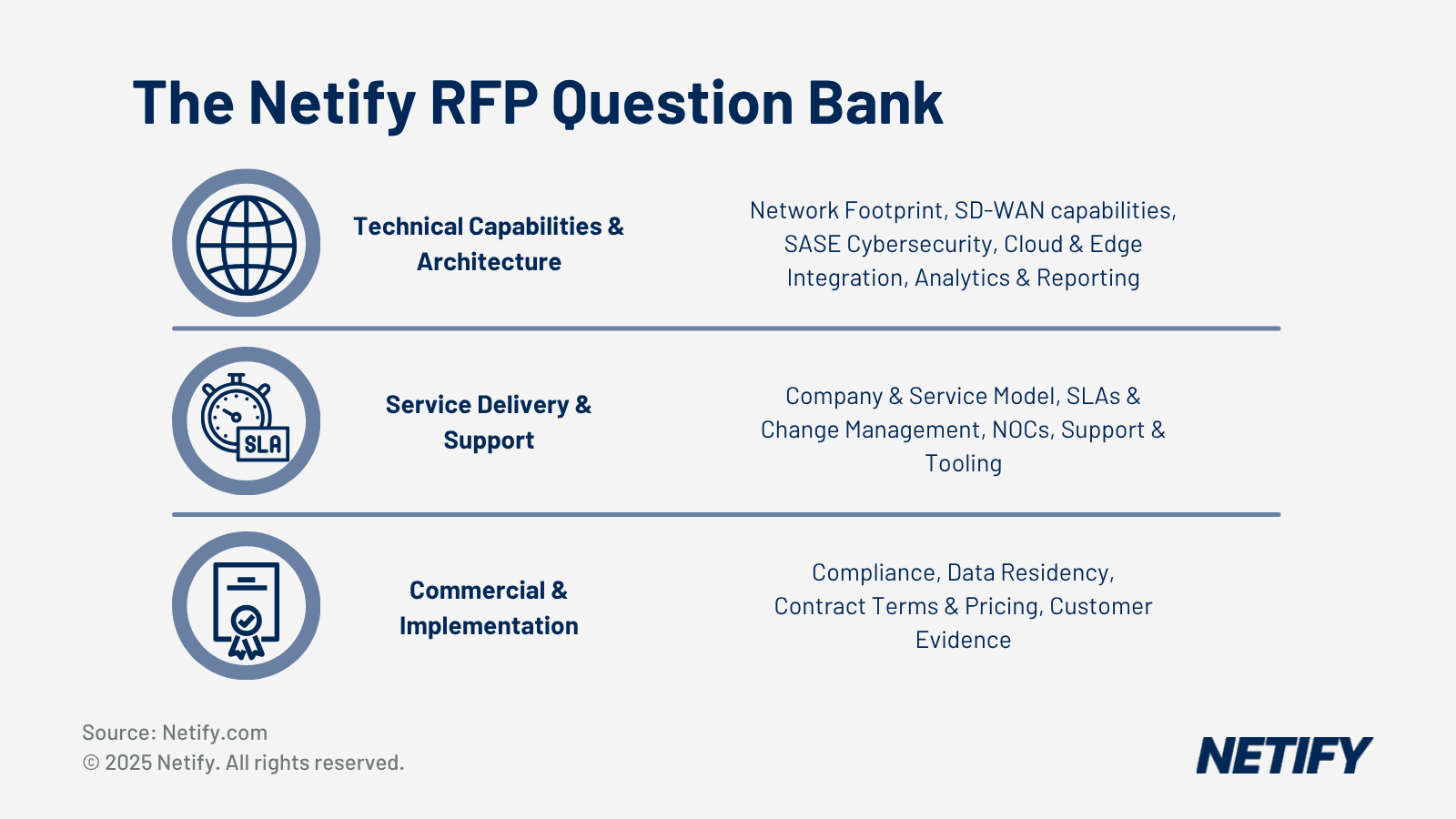
The Netify SASE RFP Builder is built around our vendor-neutral questions bank organised into categories that cover everything from company credentials through to implementation practices.
The builder allows you to customise which question categories you include, letting you focus vendor responses on what actually matters to your evaluation. The platform then generates your complete RFP with proper structure, context sections and all selected questions formatted for vendor response.
The Core Sections of a Well-Structured SASE RFP
When you use the Netify SASE RFP Builder, these sections are automatically included in your generated document, with your customised content integrated appropriately.
1. Executive Summary
This section gives vendors a high-level view of what you're trying to achieve and your business context, as well as explaining what’s driving your business to leverage SASE and the problem(s) you're solving. Some of the most common driving factors include:
- Migrating away from MPLS to reduce costs.
- Responding to security incidents that exposed limitations in your current architecture.
- Supporting a shift to remote and hybrid working.
By providing these drivers, vendors can tailor their responses to highlight how their solutions tackle these issues and gives them a greater insight into which SASE capabilities matter most to your organisation.
2. Background and Current Environment
Clarify your infrastructure, such as your current network topology, security stack, identity architecture, user distribution and branch footprint with enough detail that vendors can frame their solution appropriately.
You should include information about your existing SD-WAN or MPLS infrastructure, current security tools (firewalls, VPNs), identity providers and any cloud platforms you're already using.
It’s also worthwhile noting any technical constraints or requirements that aren’t already included, such as if you have compliance requirements that constrain architecture choices or have existing vendor relationships you need to maintain, state these clearly so vendors can propose solutions that work within your requirements.
3. Scope and Objectives
Define exactly which locations, users, systems and regions are in scope for this project. Equally importantly, state what's out of scope so vendors don't expand beyond realistic needs, growth or add price for capabilities you don't need.
4. Required Technical and Security Capabilities
This is where the Netify SASE RFP Builder's questions bank is particularly valuable - rather than listing hundreds of individual questions in your RFP structure yourself, our app automatically generates this section based on real world case studies and you can quickly select them by pre-organised question categories to easily fill-out your RFP.
5. Architecture Requirements
State how the SASE solution should actually work and include specific questions about traffic flow, cloud delivery models, resilience and identity integration.
- Define Traffic Flow: Describe requirements for traffic flow (how traffic gets from users to applications) and specify whether you expect all traffic to backhaul through regional hubs or connect directly to the nearest PoP.
- Specify Cloud Delivery: PoP presence significantly impacts application performance therefore you should determine which geographic regions must have PoPs nearby.
- Detail Resilience: Resilience requirements should be explicit, highlighting your tolerance for downtime and whether you require features like active-active PoP failover.
6. Operational Requirements
For support hours, be realistic about what you actually need – whilst you might not need 24/7 monitoring for day-to-day activities, you should consider if you might need it for critical incidents.
Escalation paths should be defined, with vendors providing specific names, roles and contact methods rather than generic "we have escalation procedures" statements.
7. Service Levels and Measurement Criteria
State the specific metrics you expect vendors to commit to, such as uptime figures, latency ranges, response times and availability guarantees. For example, the Netify platform's SLAs & Change Management question category ensures vendors provide detailed, comparable commitments.
Rather than accepting generic "99.9% uptime" statements, specify what you're actually measuring. Is that per-PoP availability, end-to-end service availability or availability of specific services like ZTNA or SWG? For latency, specify the measurement criteria. Ask vendors to specify their service credit structure - understanding their approach reveals how confident they are in their platform reliability.
8. Governance, Compliance and Reporting
For regulated industries or organisations with data sovereignty requirements, the Netify SASE RFP Builder includes compliance questions covering certifications, data residency, logging, GDPR considerations and data handling requirements.
9. Pricing Format
One of the biggest challenges in SASE procurement is comparing pricing across vendors who use completely different pricing models. The best way to mitigate this is to ask for a breakdown of one-off versus recurring charges. These can include any implementation costs, hardware for branch locations, training and professional services as well as ongoing platform licences, support costs and bandwidth charges. Further to this, for multi-year contracts, it’s also a good idea to ask for pricing across different contract lengths, enabling you to ensure you get the best deal for your needs.
10. Vendor Submission Instructions
This final section provides the practical details vendors need to respond properly. The Netify SASE RFP Builder automatically includes standardised submission, therefore removing this from the equation.
This section should cover submission deadlines, required response format and the process for raising questions or requesting clarifications. For submission deadlines, allow sufficient time for vendors to prepare thorough responses - typically three to four weeks minimum for a detailed SASE RFP.
Copy-and-Paste SASE RFP Framework
Whilst we’d strongly recommend using the built-in templates from the Netify RFP builder app, if you’re not yet ready to utilise it or just want a basic idea of what to include, we’ve provided a simplified copy-and-paste RFP template below:
1. Executive Summary - Describe the project purpose, business drivers and your overall goals that you’d like to achieve.
2. Background and Current Environment – Provide a brief summary of current network, security tools and any potential constraints or critical requirements that vendors must adhere to.
3. Project Scope and Objectives - Define what's in scope and what’s not, providing measurable objectives against these for a clear success criteria.
4. Required Technical and Security Capabilities - List the capabilities needed and areas of networking/security that vendors must address.
5. Architecture Requirements - Describe expectations for traffic flow and if it’s necessary that vendors offer a PoP/backbone network.
6. Operational Requirements - This aids requirements for support hours, escalation procedures, as well as change management and responsibilities (DIY, co-managed or fully managed).
7. Service Levels and Measurement Criteria - Specify any uptime requirements, what are acceptable latency ranges and how quick support response times need to be.
8. Governance, Compliance and Reporting - State any regulations that you’re required to comply with, data residency criteria and reporting for audits.
9. Pricing Format - Whilst vendors may opt to provide pricing in their own format (due to pricing often being based on differing metrics), it can be worthwhile to request pricing in a comparable format, such as a breakdown of one-off against recurring costs.
10. Vendor Submission Instructions - Provide vendors with clear deadlines, any formatting requirements.
These sections should act as building blocks for your RFP, giving you a baseline that you can utilise. For a more complete set of questions organised across capability categories, we’d strongly recommend using the Netify SASE RFP Builder, where you’ll get to access our questions bank and generate a professional RFP in minutes.
Common Structural Issues in Real-World SASE RFPs
We’ve noted that often times, missing or vague scope definitions are the most common problem when businesses build their RFPs. For example, RFPs that say "we need SASE for our organisation" without defining how many sites, users, regions or specific requirements force vendors to make assumptions and delay progress significantly. Furthermore, different assumptions lead to incomparable responses and therefore we’ve designed the Netify platform to require your business to specify scope clearly before generating your RFP, preventing this issue entirely.
Another issue we’ve commonly seen is unstructured technical requirements that make it complex for vendor to interpret and respond to. When RFPs jump from one idea to the other or list hundreds of questions without logical grouping or context, vendors struggle to provide coherent answers – this issue is solved through our app, which groups each section together, providing suppliers with clear questions groups, all logically organised within each category.
How to Use This Template Internally
Given we’ve already detailed how your business can run into issues from incomplete RFPs but one of the main ways this can come about is by not asking all of your key user groups about requirements. Before sending your RFP to vendors, this template can actually prevent these issues and serve as a useful internal planning tool - using it to structure your RFP helps align stakeholders and clarifies your own requirements before you involve vendors.
We’d recommend that you start by drafting the executive summary and background sections internally as this focuses on why you're considering SASE and what you're trying to achieve.
After you complete the summary, the scope and objectives section help align technical and business stakeholders. For example, your security team might assume the project includes all remote users, whilst your network team thinks it's just branch offices. By clearly defining your scope and objectives, you can prevent potential disconnects ahead of time and ensures that you don’t have to revise requirements further down the line.
Conclusion
A clear, well-structured SASE RFP creates clearer vendor responses and easier comparison - the template we've provided gives you a practical framework that you can adapt for your organisation's specific needs whilst ensuring you cover all necessary areas.
However, building an SASE RFP manually still requires significant time and expertise.
The Netify SASE RFP Builder transforms this process by providing a professionally structured template with vendor-neutral questions organised into logical categories. Rather than spending weeks researching what to ask and how to structure your document, you can generate a complete, ready-to-use RFP in minutes.

Harry holds a BSc (Hons) in Computer Science from the University of East Anglia and is ISC2 Certified in Cybersecurity (CC). He serves as a Cybersecurity Writer here at Netify, where he specialises in enterprise networking technologies. With expertise in Software-Defined Wide Area Networks (SD-WAN) and Secure Access Service Edge (SASE) architectures, Harry provides in-depth analysis of leading vendors and network solutions.
Fact-checked by: Robert Sturt - Managing Director, Netify